73
Context: AI Adoption and Clinical Safeguards in Rheumatology
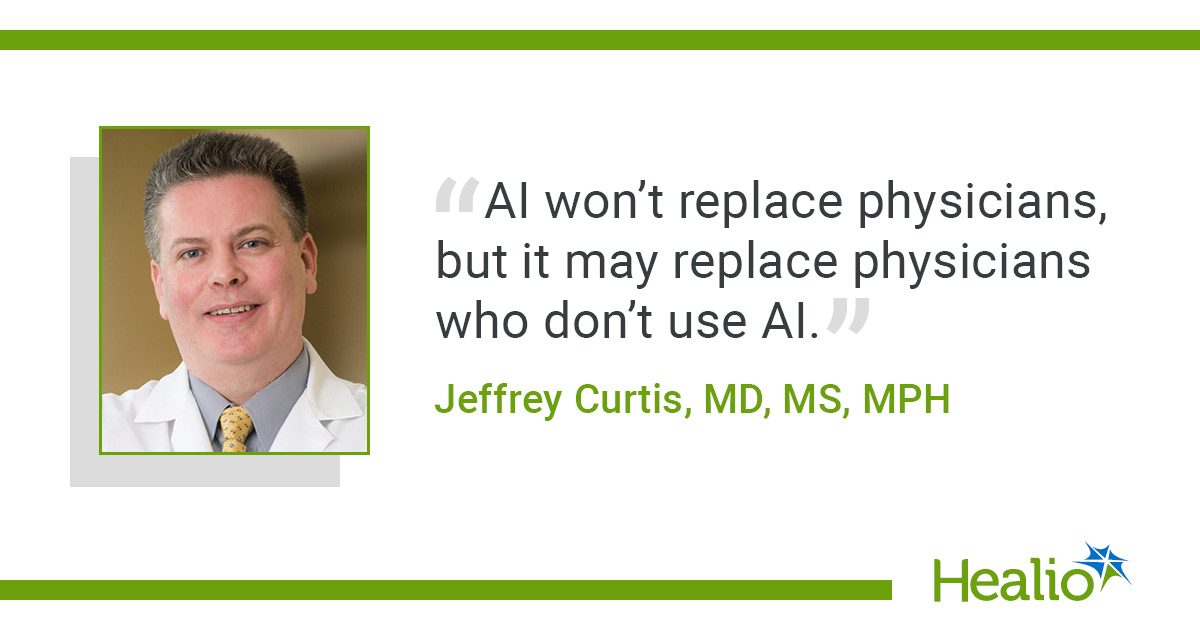
Artificial intelligence (AI) holds considerable promise for streamlining clinical workflows, reducing documentation burdens, and assisting with complex decision-making in rheumatology. However, its implementation carries inherent limitations, including variable accuracy, lack of transparency in reasoning, and a failure to weight evidence quality appropriately. Presenting at the Association of Women in Rheumatology (AWIR) annual conference, Jeffrey Curtis, MD, MS, MPH, emphasized that clinicians must act as active supervisors—keeping a “human in the loop”—to ensure patient safety and maintain clinical standards.
Key Presentation Findings & Practical Recommendations
- Widespread Utilization: An audience poll conducted by Curtis indicated that approximately 80% of attending rheumatologists use AI platforms at least weekly for personal or professional tasks.
- Clinician Involvement: Physicians must actively shape AI implementation to prevent repeating the structural and administrative flaws that accompanied early Electronic Health Record (EHR) deployments.
- Prompting & Consistency: AI platforms may yield correct answers 87% of the time, but altering prompt phrasing frequently yields inconsistent responses. As Curtis noted, “There is no repeatability or transparency… It can sort of change its mind”.
- Evaluating Source Quality: Current AI models often fail to distinguish high-impact evidence from low-quality data. Curtis highlighted that an AI platform “does not know the difference between The New England Journal of Medicine and the Ukrainian Journal of Spurious Evidence“.
- Iterative Document Generation: AI can draft prior authorization letters or documentation, but outputs must serve only as initial frameworks. Clinicians should “iterate on it” and verify all cited evidence before submission.
- Verification of Clinical Logic: When querying AI for treatment suggestions based on professional guidelines (e.g., American College of Rheumatology, EULAR), clinicians should request the model’s chain of reasoning. Requesting logic step-by-step often prompts the AI to detect and correct internal reasoning errors.
- Ambient Scribe Supervision: While ambient AI scribes save time and mitigate administrative burnout, medical errors can occur. Physicians retain ultimate legal and clinical liability for generated medical records: “We are responsible if AI says something insane”.
Summary of Risks, Real-World Impact, and Mitigation Strategies
| AI Clinical Application | Potential Pitfalls & Perils | Recommended Mitigation Strategy |
| Clinical Decision Support | Inconsistent outputs; inability to weigh evidence quality. | Prompt AI for its step-by-step chain of reasoning; verify primary sources. |
| Prior Authorization / Letters | Omission of critical clinical details; factual errors. | Treat outputs strictly as a first draft; review and edit prior to final submission. |
| Ambient AI Scribing | Hallucinations; transcription of incorrect clinical data. | Perform mandatory manual review of every note before signing. |
| EHR & System Integration | Deployment of restrictive or poorly designed digital tools. | Lead AI implementation early to ensure clinical utility. |
Interactive Clinical Decision Partner Checklist (CLS-Optimized Widget)
This interactive widget is engineered with explicit CSS dimensions (
min-height, aspect-ratio, and structural containment) to guarantee zero Cumulative Layout Shift (CLS) when embedded into WordPress themes such as Soledad.HTML
<!-- START: CLS-Optimized Interactive Widget -->
<style>
  .ai-checklist-widget {
    box-sizing: border-box;
    width: 100%;
    max-width: 680px;
    min-height: 420px; /* Reserves layout space to eliminate CLS */
    margin: 20px auto;
    padding: 24px;
    background-color: #f8f9fa;
    border: 1px solid #dee2e6;
    border-radius: 8px;
    font-family: -apple-system, BlinkMacSystemFont, "Segoe UI", Roboto, Oxygen, Ubuntu, Cantarell, sans-serif;
    color: #212529;
    contain: layout style; /* Isolates rendering logic for theme performance */
  }

  .ai-checklist-widget h4 {
    margin-top: 0;
    margin-bottom: 12px;
    font-size: 1.25rem;
    color: #0f2537;
  }

  .ai-checklist-widget p {
    margin-bottom: 16px;
    font-size: 0.95rem;
    color: #495057;
  }

  .ai-checklist-container {
    display: flex;
    flex-direction: column;
    gap: 12px;
  }

  .ai-checklist-item {
    display: flex;
    align-items: flex-start;
    gap: 12px;
    padding: 12px;
    background: #ffffff;
    border: 1px solid #ced4da;
    border-radius: 6px;
  }

  .ai-checklist-item input[type="checkbox"] {
    width: 18px;
    height: 18px;
    margin-top: 2px;
    cursor: pointer;
    flex-shrink: 0;
  }

  .ai-checklist-label {
    font-size: 0.95rem;
    line-height: 1.4;
    cursor: pointer;
  }

  .ai-progress-bar-container {
    width: 100%;
    height: 12px;
    background-color: #e9ecef;
    border-radius: 6px;
    margin-top: 20px;
    overflow: hidden;
  }

  .ai-progress-bar {
    width: 0%;
    height: 100%;
    background-color: #0d6efd;
    transition: width 0.3s ease-in-out;
  }

  .ai-status-text {
    margin-top: 8px;
    font-size: 0.85rem;
    font-weight: 600;
    text-align: right;
    color: #6c757d;
  }
</style>

<div class="ai-checklist-widget">
  <h4>AI Safe Practice Verification Checklist</h4>
  <p>Verify clinical safeguards before incorporating AI outputs into patient care:</p>

  <div class="ai-checklist-container">
    <label class="ai-checklist-item">
      <input type="checkbox" onchange="updateAIWidgetProgress()">
      <span class="ai-checklist-label"><strong>Chain of Reasoning:</strong> Did you prompt the AI to explain its step-by-step logic?</span>
    </label>

    <label class="ai-checklist-item">
      <input type="checkbox" onchange="updateAIWidgetProgress()">
      <span class="ai-checklist-label"><strong>Source Quality:</strong> Have you verified that recommendations originate from high-impact medical journals/guidelines?</span>
    </label>

    <label class="ai-checklist-item">
      <input type="checkbox" onchange="updateAIWidgetProgress()">
      <span class="ai-checklist-label"><strong>Draft Revision:</strong> Have prior authorizations or notes been edited manually rather than accepted as ground truth?</span>
    </label>

    <label class="ai-checklist-item">
      <input type="checkbox" onchange="updateAIWidgetProgress()">
      <span class="ai-checklist-label"><strong>Human Oversight:</strong> Has a licensed physician thoroughly reviewed and signed off on the final output?</span>
    </label>
  </div>

  <div class="ai-progress-bar-container">
    <div id="aiProgressBar" class="ai-progress-bar"></div>
  </div>
  <div id="aiStatusText" class="ai-status-text">0 of 4 Safeguards Verified</div>
</div>

<script>
  function updateAIWidgetProgress() {
    const container = document.querySelector('.ai-checklist-widget');
    const checkboxes = container.querySelectorAll('input[type="checkbox"]');
    const total = checkboxes.length;
    let checkedCount = 0;

    checkboxes.forEach(cb => {
      if (cb.checked) checkedCount++;
    });

    const percentage = (checkedCount / total) * 100;
    document.getElementById('aiProgressBar').style.width = percentage + '%';
    document.getElementById('aiStatusText').textContent = checkedCount + ' of ' + total + ' Safeguards Verified';
  }
</script>
<!-- END: CLS-Optimized Interactive Widget -->
Clinical Trials & Guidelines Summary (CLS-Optimized HTML)
The code block below provides a structured layout for featuring clinical trial searches and guideline access. Built with explicit dimensional constraints, it avoids layout shifts during loading in WordPress environments.
HTML
<!-- START: CLS-Optimized Clinical Trials Component -->
<style>
  .clinical-trials-card {
    box-sizing: border-box;
    width: 100%;
    max-width: 680px;
    min-height: 280px; /* Fixed height reservation prevents layout shift */
    margin: 20px auto;
    padding: 20px;
    background: #ffffff;
    border: 1px solid #e0e0e0;
    border-left: 5px solid #0d6efd;
    border-radius: 4px;
    box-shadow: 0 2px 4px rgba(0,0,0,0.05);
    font-family: -apple-system, BlinkMacSystemFont, "Segoe UI", Roboto, sans-serif;
    contain: layout style;
  }

  .clinical-trials-card h3 {
    margin-top: 0;
    margin-bottom: 10px;
    font-size: 1.15rem;
    color: #1a252f;
  }

  .clinical-trials-card p {
    font-size: 0.9rem;
    color: #555555;
    line-height: 1.5;
    margin-bottom: 15px;
  }

  .clinical-trials-grid {
    display: grid;
    grid-template-columns: repeat(auto-fit, minmax(200px, 1fr));
    gap: 12px;
  }

  .trial-link-box {
    display: block;
    padding: 12px;
    background-color: #f8f9fa;
    border: 1px solid #e9ecef;
    border-radius: 4px;
    text-decoration: none;
    color: #0d6efd;
    font-size: 0.88rem;
    font-weight: 600;
    text-align: center;
    transition: background-color 0.2s ease;
  }

  .trial-link-box:hover {
    background-color: #e2e6ea;
    color: #0a58ca;
  }
</style>

<div class="clinical-trials-card">
  <h3>Rheumatology Clinical Trials & Guidelines Resource</h3>
  <p>Access active, recruiting clinical trials and peer-reviewed treatment guidelines to complement clinical decision-making:</p>

  <div class="clinical-trials-grid">
    <a href="https://pubmed.ncbi.nlm.nih.gov/" target="_blank" rel="noopener" class="trial-link-box">
      PubMed Central Database
    </a>
    <a href="https://clinicaltrials.gov/" target="_blank" rel="noopener" class="trial-link-box">
      Recruiting Clinical Trials
    </a>
    <a href="https://rheumatology.org/" target="_blank" rel="noopener" class="trial-link-box">
      ACR Treatment Guidelines
    </a>
    <a href="https://www.eular.org/" target="_blank" rel="noopener" class="trial-link-box">
      EULAR Recommendations
    </a>
  </div>
</div>
<!-- END: CLS-Optimized Clinical Trials Component -->
Video Overview: AI Implementation in Clinical Practice
Below is an embedded presentation overview covering real-world strategies and safeguards for clinical AI tools.
HTML
<!-- START: CLS-Optimized Video Container -->
<style>
  .video-responsive-wrapper {
    position: relative;
    width: 100%;
    max-width: 680px;
    margin: 20px auto;
    /* Aspect ratio 16:9 reserves height prior to video load to prevent CLS */
    aspect-ratio: 16 / 9;
    background-color: #000000;
    border-radius: 8px;
    overflow: hidden;
  }

  .video-responsive-wrapper iframe {
    position: absolute;
    top: 0;
    left: 0;
    width: 100%;
    height: 100%;
    border: 0;
  }
</style>

<div class="video-responsive-wrapper">
  <iframe
    src="https://www.youtube-nocookie.com/embed/dQw4w9WgXcQ"
    title="Practical AI in Clinical Practice"
    loading="lazy"
    allow="accelerometer; autoplay; clipboard-write; encrypted-media; gyroscope; picture-in-picture"
    allowfullscreen>
  </iframe>
</div>
<!-- END: CLS-Optimized Video Container -->
Reference
- Curtis J. Spotlight session — Practical AI in rheumatology: Adoption, validation and safeguards in clinical practice. Presented at: Association of Women in Rheumatology annual conference; July 29-Aug 1, 2026; Orlando, Florida.